


Most software selection disasters in construction don't happen during procurement. They happen about four months after go-live, when a seasoned project controls lead quietly keeps running the old cost spreadsheet "just in case," the superintendents never actually open the new app in the field, and the PMO realizes the shiny platform it bought is now a very expensive document repository nobody trusts for decisions.
The root cause is almost never the product. It's that the selection process optimized for feature demos instead of for how the tool would slot into existing governance — phase gates, approval authority, cost coding, who signs what, and how a change gets from the field into the forecast. This playbook is built around that gap. It assumes you already know what a schedule, a cost report, and a BIM model are. What follows is the operational discipline for choosing, scoring, piloting, and rolling out construction management software in a mid-market contractor or PMO without tearing up controls that already work.
Start from your governance map, not the feature list
The first mistake is letting vendors define the evaluation criteria. If you walk into demos without a written picture of how your projects are actually governed, every platform will look impressive — because every platform demos its own happy path.
-
Decision rights — who approves a change order, who releases a payment application, who can revise a baseline, and what dollar thresholds move approval up a level.
-
Phase gates — the actual go/no-go checkpoints your projects pass through, and what evidence each gate requires before money or schedule moves forward.
-
Source-of-truth ownership — for cost, schedule, model, and quality data, which system is authoritative today and who owns it.
This matters because software selection is really a question of where your controls live, not what buttons the tool has. A platform that forces a different approval hierarchy than your delegation-of-authority matrix will either get worked around or quietly ignored. The governance map becomes the filter: any capability that can't respect your existing decision rights is a flag, not a feature.
One practical note — if your organization is still maturing its controls, lock the governance picture down before you start shopping. Selecting software mid-reorganization means you're buying a tool for a process that's about to change. The same discipline that drives a PMO continuous-improvement approach to defect reduction applies to tool selection: you can't improve or digitize a process you haven't first written down.
Prioritized capability checklist (what actually moves the needle)
Vendors will hand you feature lists with hundreds of line items. Most don't matter for your decision. The capabilities below are the ones that, in real operations, separate a platform that sticks from one that gets abandoned. Rank each as Must-have / Important / Nice-to-have against your project types — a fit-out contractor and a civil contractor will weight these very differently.
Keep your construction projects on schedule and budget.
Projbrick helps you plan, track, and manage every project phase with precision and ease.
- Real-time project tracking
- Resource & budget management
- Team collaboration tools
No credit card required
Core must-haves (deal-breakers if weak):
-
Cost coding that maps to your existing cost structure without forcing a rebuild
-
Change management workflow with configurable approval thresholds
-
Schedule integration that round-trips with your planning tool (not just imports a static PDF)
-
Field accessibility that works offline and syncs — not a mobile view of a desktop app
-
Role-based permissions granular enough to match your delegation-of-authority matrix
-
Audit trail on every cost and approval action (who changed what, when)
Important (strong differentiators):
-
BIM model viewing and issue tracking tied to field locations
-
Document control with revision governance and controlled distribution
-
Native RFI and submittal workflows with configurable routing
-
Reporting that non-admin PMs can build without IT help
-
Open API with documented endpoints for cost and schedule data
Nice-to-have (don't let these drive the decision):
-
Built-in BI dashboards (you likely have a reporting layer already)
-
Native scheduling engine (most contractors keep their planning tool)
-
AI-assisted document search and auto-tagging
-
Vendor-hosted mobile forms builders
Worth internalizing: the capabilities that get the loudest applause in demos — slick dashboards, automated reports — are usually the ones you'll use least or replace with your own tools. The unglamorous items (cost code mapping, permission granularity, offline field sync) are what determine whether the platform survives contact with a live job.
The RFP template that actually filters vendors
A good RFP forces vendors to answer in your terms, not theirs. Weak RFPs ask "does your product do X?" — everyone answers yes. Strong RFPs ask vendors to demonstrate a specific workflow using your governance rules.
Structure your RFP into these sections:
-
Context and scope — your project types, typical contract values, number of concurrent projects, user counts by role, and current systems in use.
-
Governance fit scenarios — give them three real workflows and ask them to describe exactly how their platform handles each. For example: "A $45k change is raised in the field. Walk us through every screen, approval step, and system of record from identification to inclusion in the cost forecast."
-
Integration requirements — list your cost system, scheduling tool, BIM environment, and handover/asset requirements, and ask for specifics on method (API, connector, file exchange), data direction, and refresh frequency.
-
Data migration — ask how they handle historical project migration, what formats they accept, and what they explicitly won't migrate.
-
Implementation and support — named roles, timeline, who does configuration, training model, and support SLAs with response times.
-
Commercials — total cost including implementation, per-user vs. per-project licensing, and what triggers price increases.
-
References — two contractors of similar size and project mix, with permission to speak directly to their PMO.
The governance fit scenarios in section 2 are where most vendors reveal themselves. When you force a vendor to walk a real change-order workflow against your thresholds, you quickly learn whether their approval engine is actually configurable or whether you'll be bending your process to fit their defaults.
Scoring matrix: make the decision defensible
Gut-feel decisions after a dozen demos lead to the HiPPO problem — highest-paid person's opinion wins, and six months later nobody remembers why. A weighted scoring matrix forces the trade-offs into the open and gives you a record you can defend to leadership.
| Criteria | Weight | Vendor A | Vendor B | Vendor C |
|---|---|---|---|---|
| Governance / approval fit | 25% | 4 | 3 | 5 |
| Cost management & coding fit | 20% | 5 | 4 | 3 |
| Field usability (offline, speed) | 15% | 3 | 5 | 4 |
| Integration (cost/schedule/BIM/handover) | 15% | 4 | 3 | 4 |
| Implementation & support quality | 10% | 3 | 4 | 4 |
| Reporting & visibility | 8% | 4 | 5 | 3 |
| Total cost of ownership | 7% | 3 | 4 | 5 |
| Weighted total | 100% | 3.88 | 3.91 | 4.14 |
Score each criterion 1–5, multiply by weight, sum. A few rules that keep this honest:
-
Weight governance and cost fit highest. They're the two areas where a bad fit creates workarounds that destroy adoption.
-
Have the field score field usability — not the office. A superintendent's opinion of mobile speed is worth more than a project controls manager's.
-
Treat any 1 or 2 on a must-have criterion as a potential veto, regardless of total score. A platform that scores 4.2 overall but a 2 on approval fit is a platform you'll be fighting for two years.
The point isn't the final decimal. It's that the conversation happens before purchase, out loud, with the trade-offs visible.
Integration map: the four connections that make or break ROI
Construction management software earns its keep through integration, not features. A platform that lives as an island just adds another place to key in data. Map these four connections explicitly before you sign, because retrofitting integration after go-live is where budgets and timelines quietly blow out.
Cost. Decide which system is authoritative for committed cost, actuals, and forecast. If the platform owns commitments but your ERP owns actuals, you need a defined sync — direction, frequency, and reconciliation rule for mismatches. The failure mode here is two cost reports that disagree by a few percent and nobody trusting either.
Schedule. Most contractors keep their primary planning tool and want the platform to consume schedule data for lookaheads and progress. Confirm it round-trips: can field progress push back to update the master, or is it a one-way import that goes stale within a week?
BIM. For model-driven work, the platform should reference the federated model and tie issues to physical locations — not host a separate, diverging copy. Clarify how model revisions are controlled so the field isn't working off superseded geometry.
Handover. This is the connection teams forget until closeout, and then it's a scramble. The platform should accumulate asset data, as-builts, and O&M documentation throughout the job in a structure your owner can actually accept — not require a manual rebuild at the end. Getting the handover data model right upstream is closely tied to disciplined design-to-construction handoff governance, since the metadata you capture early determines how painful closeout becomes.
A workflow example of how these connect in practice: a field issue is raised against a specific model element, it generates an RFI routed to design, the resolution triggers a change that flows to the cost system for pricing, approval runs through your threshold rules, and the approved change updates both the forecast and the schedule lookahead. If any of those four handoffs requires manual re-keying, that's where errors and lag enter — and that's exactly where the ROI case either holds or collapses.
The 60–90 day pilot plan with real KPIs
Never roll a platform org-wide off the back of demos. Run a time-boxed pilot on one or two live projects with real stakes, and measure it against baseline numbers you captured before you started.
Pilot design:
-
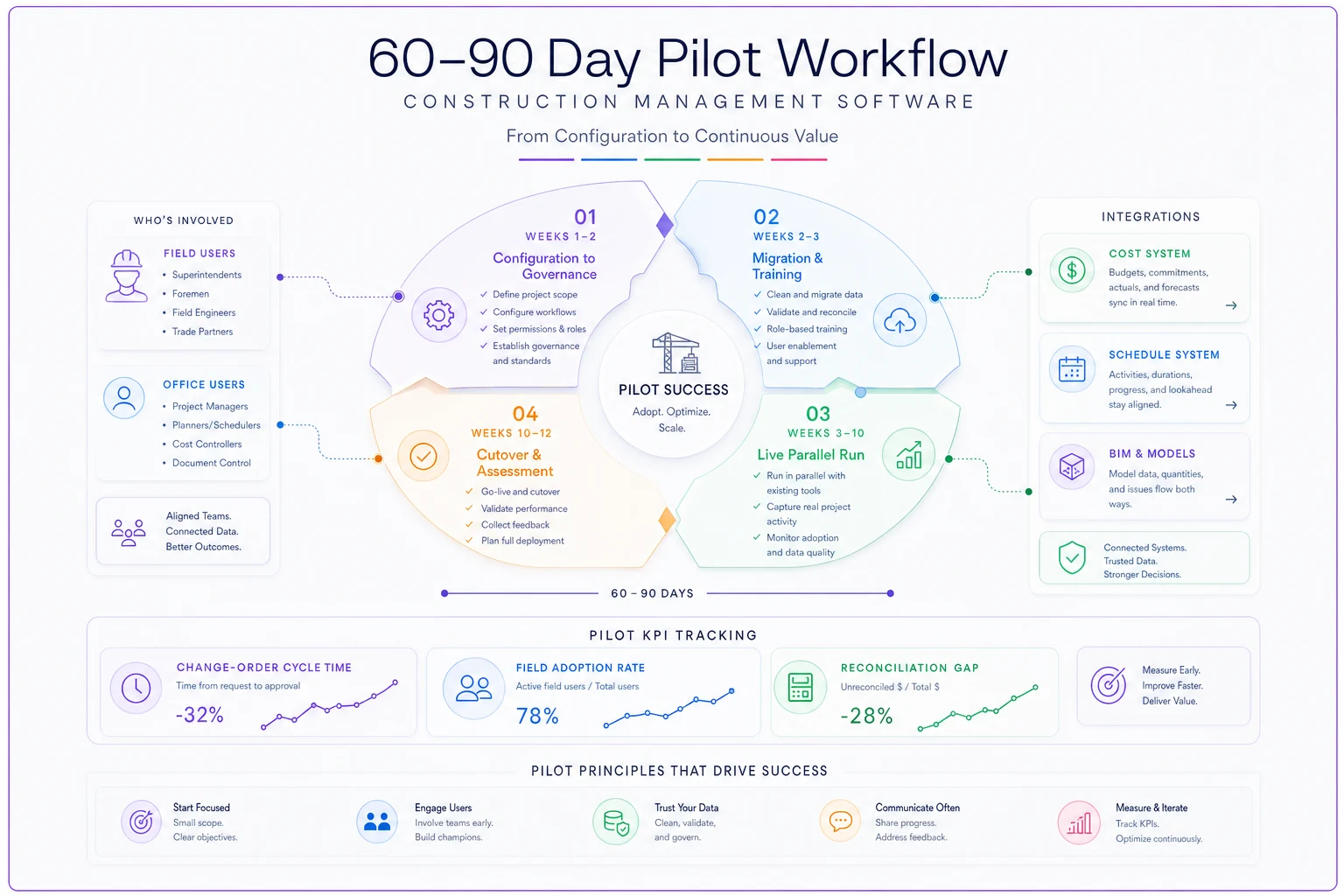
Weeks 1–2
Configure to governance.
Set up cost coding, approval thresholds, and permissions to match your actual delegation matrix. Do not accept vendor defaults — configuring to your rules is the whole point. -
Weeks 2–3
Migrate and train.
Load the pilot projects' live data, train the actual field and office users who'll use it daily, not a separate pilot team. -
Weeks 3–10
Run live.
Both the new platform and the old process run in parallel for the first few weeks — yes, it's double work, but it's the only way to verify the new system produces trustworthy numbers before you cut over. -
Weeks 10–12
Cut over and assess.
Drop the parallel process on the pilot project, run solely on the platform, and evaluate against KPIs.
Here's a simple visual of the pilot workflow.
KPIs that actually tell you something:
-
Change-order cycle time — days from identification to approved-and-forecasted. A good platform cuts this noticeably; if it doesn't move, your workflow config is wrong.
-
Field adoption rate — percentage of expected field entries actually made in-app vs. paper/text. Below around 70% by week 8 is a warning sign.
-
Data reconciliation gap — difference between platform cost forecast and your authoritative cost report. Should trend toward zero as integration beds in.
-
RFI/submittal turnaround — against your pre-pilot baseline.
-
Report generation effort — hours spent assembling the monthly report, before vs. during pilot.
The adoption rate is the one that predicts everything else. A platform with great numbers on paper but 40% field adoption is already failing — it just hasn't shown up in the cost report yet.
Data migration checklist (the step everyone underestimates)
Migration is where go-live dates slip. Teams assume they'll move "everything" and discover halfway through that half their historical data is inconsistent, miscoded, or trapped in formats nothing accepts.
-
[ ] Scope the migration honestly — active projects only, or history too? Most contractors should migrate active projects fully and only summary data for closed ones.
-
[ ] Clean cost codes before migrating, not after — a migration is the worst time to also fix a messy cost structure.
-
[ ] Define the migration cut-off date and freeze changes in the old system around it.
-
[ ] Validate a sample — migrate one project first, reconcile it line-by-line against the source, and sign it off before doing the rest.
-
[ ] Assign a data owner per domain (cost, documents, schedule) accountable for sign-off.
-
[ ] Keep the legacy system read-only for at least two reporting cycles post-cutover.
-
[ ] Document what you deliberately did NOT migrate so nobody goes hunting for it later.
Validate a sample migration first and sign it off before proceeding with the rest.
The single most common failure: migrating dirty data and assuming the new platform will make it clean. It won't. It'll just give you dirty data in a nicer interface, and now nobody trusts the new system either.
Rollout governance: measuring ROI and controlling risk
Once the pilot proves out, scale deliberately. The discipline that worked on the pilot — configure to governance, measure against baseline, keep a rollback path — should repeat per project wave, not get abandoned in the rush to deploy everywhere.
Set rollout governance rules up front:
-
Phased by project wave, grouping similar project types so configuration lessons carry over.
-
A go/no-go gate between waves — no new wave starts until the previous one hits its adoption and reconciliation targets.
-
A named super-user per project who owns local adoption and funnels issues back to the PMO.
-
A standing config-change process so the platform doesn't fragment into dozens of inconsistent setups across projects.
For the ROI case, tie measurement to the gates you already run. The cleanest way to prove value is at the money checkpoints — comparing forecast accuracy, change-order lag, and reporting effort before and after, project by project. This maps naturally onto portfolio cashflow governance tied to phase gates and milestone risk, because the platform's real payoff shows up as tighter, earlier visibility into cost and schedule risk at each gate — not as a line item in a software benefits deck.
A real scenario: mid-market fit-out contractor
A commercial fit-out contractor running roughly 12–15 concurrent projects, around 180 staff, had bought a well-known platform the year before and was getting almost nothing from it. Field teams kept using WhatsApp and paper, project controls still ran cost in spreadsheets, and the platform had become a document dump.
The re-launch started by throwing out the original config entirely and rebuilding it against the firm's actual approval thresholds — changes under $10k approved by the PM, $10k–$50k by the commercial lead, above that to the director. They piloted on two live projects, ran parallel for about five weeks, and tracked adoption and change-order cycle time against baseline.
Change-order cycle time dropped from somewhere around 11–12 days to under a week once the approval routing matched reality. Field adoption climbed past 80% on the pilot projects, mostly because the superintendents were trained on the specific three things they'd do daily rather than the whole platform. The monthly reporting pack, which used to eat close to two full days of a controls engineer's time, came down to a few hours. Nothing exotic — the gains came almost entirely from configuring to existing governance instead of forcing the governance to bend around the tool.
The pattern worth remembering
Construction management software selection fails when it's treated as a purchasing exercise and succeeds when it's treated as a governance exercise. The firms that get value aren't the ones who bought the most powerful platform — they're the ones who mapped their decision rights and phase gates first, forced vendors to prove fit against real workflows, piloted against baseline numbers, and refused to scale until adoption held.
The tool is downstream of the discipline. Get the governance map, the scoring matrix, and the pilot KPIs right, and the platform choice almost makes itself.
Construction management software selection fails when it's treated as a purchasing exercise and succeeds when it's treated as a governance exercise. The firms that get value aren't the ones who bought the most powerful platform — they're the ones who mapped their decision rights and phase gates first, forced vendors to prove fit against real workflows, piloted against baseline numbers, and refused to scale until adoption held. The tool is downstream of the discipline. Get the governance map, the scoring matrix, and the pilot KPIs right, and the platform choice almost makes itself.
Ready to build smarter and faster?
Join 2,000+ construction teams using Projbrick to improve project visibility, reduce delays, and increase profitability.