



A delay claim goes to arbitration two years after the pour. The counterparty's expert pulls up your site photos and asks one question: "How do we know this photo is from the date you say it is?" And the room goes quiet, because the answer is a JPEG someone copied off a superintendent's phone, renamed by hand, and dropped into a shared folder that's been reorganized four times since.
That's the moment a construction photo chain of custody standard earns its keep — or the moment you find out you never had one. Photos lose evidentiary weight not because the work wasn't documented, but because nobody can prove the file hasn't changed, when it was taken, or where it came from. This post is about closing that gap with rules tight enough to survive cross‑examination and simple enough that a foreman will actually follow them.
Why field photos fall apart as evidence
The failure almost never happens at capture. It happens in the handling.
A typical sequence: a crew lead shoots 40 photos of exposed rebar before a slab pour. Good. Then the phone auto‑uploads to a personal cloud account, which strips or rewrites EXIF data during compression. Someone later AirDrops a subset to the PM, who renames them "slab 3 rebar final.jpg" and saves them to a desktop. Three months later those get dragged into a project folder, and the file's "date modified" now reads the day of the drag, not the day of the pour.
By the time a claim surfaces, you've got images whose metadata has been touched at least three times by three different systems, none of which recorded who did what. The photos might be completely genuine. But genuine and provable are different standards, and only one of them matters when money is on the line.
The other common breakdown is actually the opposite problem — over‑documentation with no structure. A 90,000‑photo dump with no naming logic is almost as useless as no photos at all, because finding the three images that matter costs a paralegal a week of billable hours and you still can't demonstrate completeness.
The four properties a photo needs to hold up
Before any naming table or workflow, it helps to be clear on what you're actually trying to prove. A defensible field photo answers four questions without relying on anyone's memory:
Keep your construction projects on schedule and budget.
Projbrick helps you plan, track, and manage every project phase with precision and ease.
- Real-time project tracking
- Resource & budget management
- Team collaboration tools
No credit card required
-
Authenticity — the file is the original, unaltered since capture
-
Time — when it was taken, verifiable independently
-
Place — where it was taken, to a reasonable radius
-
Custody — who held it between capture and submission, with no unexplained gaps
Each rule below maps to one of these. If a proposed process doesn't strengthen one of the four, it's overhead, not protection.
Filename conventions: boring on purpose
The filename is the first thing a reviewer reads and the cheapest piece of metadata to make bulletproof. The goal is a name that's machine‑sortable, human‑readable, and never requires renaming after the fact.
Here's a structure that's held up well on commercial projects:
PROJ-AREA-DISC-YYYYMMDD-HHMM-SEQ-INIT.ext
| Segment | Meaning | Example | Notes |
|---|---|---|---|
| PROJ | Project code | HD17 | Short, fixed per job, never reused |
| AREA | Location/grid/level | L03-GC | Tie to the grid or zone map, not "north side" |
| DISC | Discipline/scope | REBAR | Controlled vocabulary, 3–6 chars |
| YYYYMMDD | Capture date | 20250611 | From capture, never from file copy |
| HHMM | Capture time, 24h | 0742 | Local site time, consistent per project |
| SEQ | Sequence in that set | 004 | Zero‑padded, resets per capture session |
| INIT | Capturer initials | JM | Ties to a named person |
| ext | Original extension | .jpg | Keep the original, don't convert |
So a file reads HD17-L03-GC-REBAR-20250611-0742-004-JM.jpg. Ugly, yes. But it sorts chronologically on its own, survives being moved between systems, and tells a reviewer the who/what/where/when before they even open it.
Automate filename generation at ingest to eliminate hand‑typing errors.
-
The filename is derived from capture metadata, not typed by hand. Hand‑typed dates drift. Someone will write the date they uploaded, not the date they shot, and now your filename contradicts your EXIF.
-
Controlled vocabularies for AREA and DISC. If one person writes
REBAR, anotherrebar, and a thirdRNF, you've lost sortability. Publish the list, keep it to two pages. -
Never rename after capture. A rename is a change. If the name is wrong, log a correction — don't overwrite.
Discipline codes worth standardizing
Keep the list short enough to memorize. A workable starter set:
| Code | Scope |
|---|---|
| EXCV | Excavation / earthworks |
| REBAR | Reinforcement before pour |
| FORM | Formwork |
| POUR | Concrete placement |
| MEP | Mechanical/electrical/plumbing rough‑in |
| FRAME | Structural framing |
| WPRF | Waterproofing |
| DMG | Damage / defect |
| COND | Pre‑existing condition |
| PROG | General progress |
The COND and DMG codes matter more than they look. Pre‑existing condition photos are the ones that win differing‑site‑condition and third‑party damage disputes, and they're the ones nobody tags consistently.
Minimal metadata: capture less, protect more
The instinct is to collect everything. Don't. Every custom field you add is a field someone fills in wrong under time pressure. Keep embedded metadata to what proves the four properties and leave the rest in your project records.
-
Original capture timestamp (EXIF
DateTimeOriginal) -
GPS coordinates (EXIF, where available)
-
Device identifier
-
Capturer name or ID
-
Project and area reference (mirrors the filename)
That's it. Everything else — weather, inspector present, related RFI numbers — belongs in a sidecar record keyed to the filename, not jammed into the image. The reason is simple: the more you write into the file, the more surface area you create for an opposing expert to find an inconsistency. A photo with five clean fields that all agree is stronger than one with twenty fields where two conflict.
One overlooked point: strip nothing, but add nothing destructive either. If your upload tool re‑encodes images to save storage, it rewrites EXIF and resets timestamps. Turn that off. Store originals at full resolution, in their original format. Storage is cheap; a rebuilt metadata record is not admissible.
Geotag and timestamp rules
Timestamps and geotags are where good‑faith documentation quietly becomes unreliable, because the defaults on most devices work against you.
Timestamps. The problem is clock drift and timezone chaos. A phone set to auto‑timezone that crosses a boundary, or a camera whose clock was never set, produces timestamps that look authoritative and are wrong. Fixes:
-
Standardize on a single timezone per project and document it. Most disputes are easier to defend with consistent local site time than with mixed UTC offsets.
-
Verify device clocks at the start of each project and after any device reset. A 20‑minute clock error that aligns photos to the wrong shift can cost you a day‑rate argument.
-
Prefer network‑synced time where the device supports it.
Geotags. GPS on a dense urban site or inside a concrete structure is unreliable — multipath reflections can place a photo 80 meters off, or inside the building next door. Rules that keep geotags useful instead of misleading:
-
Treat GPS as corroborating, not primary. A geotag that roughly matches the AREA code strengthens the record; a missing geotag doesn't invalidate it.
-
Never "correct" a geotag after the fact. An edited coordinate is worse than no coordinate.
-
For interior and below‑grade work where GPS fails, lean on the AREA code tied to your grid map plus a visible reference in frame (column marker, level signage).
The honest position in a claim is: "GPS is accurate where signal allowed; where it didn't, location is established by grid reference and visible markers." That survives scrutiny. Pretending every photo has reliable GPS does not.
Hashing: the piece most teams skip
This is the step that turns "trust us" into "verify it yourself," and it's the one almost nobody does on construction projects.
A cryptographic hash (SHA‑256 is the sensible default) is a fingerprint of the file's exact bytes. Change a single pixel, a single metadata field, anything — and the hash changes completely. If you record the hash of each photo at the moment it enters your custody, you can later prove the file submitted in year three is byte‑for‑byte identical to the one captured on day one. The workflow is straightforward:
-
At upload, the file is hashed and the hash recorded against the filename in a register.
-
That register is itself timestamped — ideally logged to a system that records the entry time independently of the user.
-
Any later copy can be re‑hashed and compared. Match means untouched. Mismatch means something changed, and you investigate rather than submit.
The power of this isn't just defensive. When your claims package includes a hash register showing every image's fingerprint recorded at capture, the opposing side's "how do we know these weren't edited" argument collapses before it starts. They can run the hashes themselves.
A realistic objection: "My field staff can't run SHA‑256 on a phone." They don't need to. Hashing should happen automatically at the upload boundary — the moment the photo leaves the device and enters your project record. The crew's only job is capturing and uploading promptly. The system handles the fingerprinting.
The upload workflow that preserves custody
Custody is a chain, and a chain is only as good as its weakest documented link. The objective is zero unexplained gaps between the shutter and the archive.
Step 1 — Capture. Photo taken on an approved device with clock verified and location on. No renaming, no editing on the device.
Step 2 — Prompt upload. Images move to the project record within the same shift. The longer a photo lives only on a personal device, the bigger the custody gap you'll have to explain later. Same‑day upload is the single highest‑leverage habit here.
Step 3 — Ingest and hash. On upload, the system reads original EXIF, applies the filename convention from that metadata, computes and stores the SHA‑256 hash, and records who uploaded and when. Original file preserved untouched.
Step 4 — Register entry. A line is written to the custody register: filename, hash, capture time, upload time, capturer, uploader. This register is append‑only — corrections are new lines, never overwrites.
Step 5 — Archive. Originals go to write‑once storage. Working copies for daily use are separate; nobody edits the originals.
A quick visual of the upload workflow helps teams remember the steps.
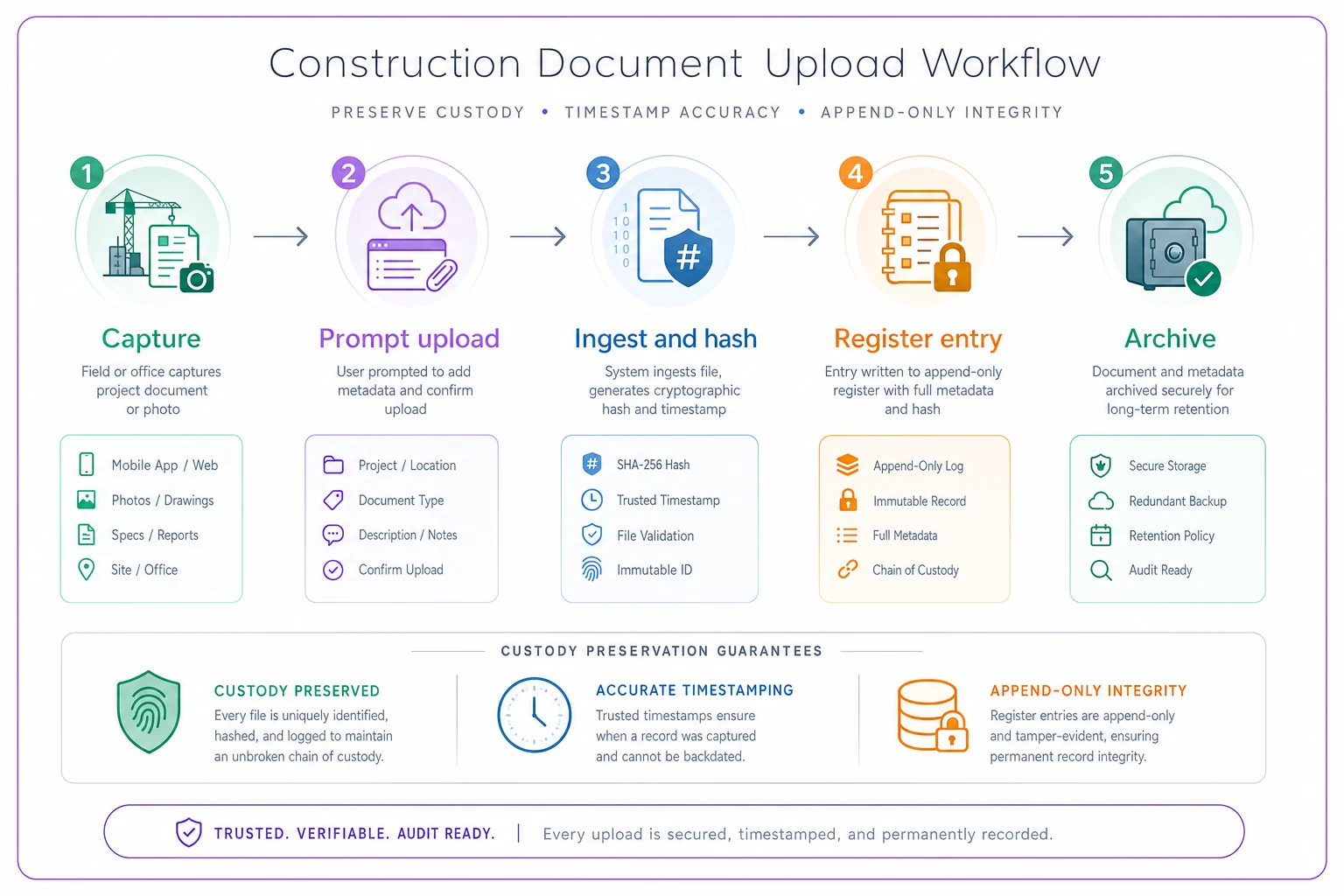
The quiet failure point is Step 2. Everything downstream can be clean, but a three‑week gap where photos sat on a phone is the gap opposing counsel will probe. Shorten it with policy, not heroics.
This photo discipline doesn't live in isolation, either. It's the backbone under your pay‑app evidence and your progress claims. If you've built a minimal field evidence packet with photo and measurement protocols, the chain‑of‑custody rules here are what make those photos defensible when a payment is disputed rather than just approved. The same register that supports a claim also speeds the kind of reconciliation covered in the fast pay‑app verification checklist — because reviewers trust photos they can verify.
Verification checklist for PMs and claims teams
Run this before any photo set goes into a claim, pay application, or dispute package:
-
[ ] Every file follows the naming convention, no hand‑typed dates
-
[ ] Filename date matches EXIF
DateTimeOriginalfor each file -
[ ] Original files preserved at full resolution, original format, no re‑encoding
-
[ ] SHA‑256 hash recorded for every file in the custody register
-
[ ] Re‑hash of a 10% sample matches the register (spot check for integrity)
-
[ ] Device clocks were verified at project start; any drift documented
-
[ ] Timezone is consistent and documented across the set
-
[ ] Geotags present where signal allowed; interior/below‑grade gaps explained by grid reference
-
[ ] Upload timestamps show no unexplained custody gaps (flag anything over ~48h device‑to‑record)
-
[ ] Register is append‑only, with all corrections logged rather than overwritten
-
[ ] Capturer and uploader identified for every file
-
[ ] Controlled vocabulary used for AREA and DISC — no freetext variants
If a set fails more than a couple of these, don't submit it raw. Document the gaps honestly and note what's corroborated by other evidence. A disclosed limitation is defensible; a discovered one is not.
A real scenario
A mid‑size GC on a seven‑story mixed‑use job hit a differing‑site‑condition dispute — unexpected rock during excavation, a claim worth somewhere in the low six figures for the extra dig and the schedule hit.
Their excavation photos existed, but they'd been handled the usual way: shot on two superintendents' phones, uploaded to a shared drive in batches "when there was time," renamed inconsistently, some weeks after capture. When the owner's expert challenged the dates, the GC couldn't cleanly prove when the rock was exposed versus when the photos were filed. The images drifted from solid evidence to "we'll have to argue about it," and the settlement landed well below the documented cost — the team figured they left roughly $40k–$60k on the table largely because the photo record couldn't carry its own weight.
On the next phase, they tightened it up. Same‑shift uploads, automatic hashing at ingest, filenames derived from EXIF, a custody register, and COND‑tagged pre‑excavation photos. When a second condition issue came up near the end of the job, the photo package went in with a hash register attached. The owner's side ran the hashes, found nothing to contest, and the claim resolved in weeks instead of months — no expert‑versus‑expert fight over authenticity, because there was nothing to fight about.
The work was documented both times. The difference was whether the documentation could prove itself.
When this level of rigor makes sense — and when it doesn't
Full chain‑of‑custody discipline — hashing, registers, append‑only logs — is worth it on projects with real claims exposure: large contracts, tight schedules with LDs, public work, anything where a dispute is plausible and the dollar figures justify the overhead.
It's overkill on a small, low‑risk job where photos are purely for internal progress tracking and nobody will ever litigate. Running a two‑week kitchen renovation through a hashing workflow is process for its own sake.
The teams that get this wrong tend to swing to extremes — either no standard at all, or a 40‑field metadata form nobody completes. The sweet spot is the minimal set that proves the four properties, applied consistently, and automated at the upload boundary so the field crew's only job is to shoot and send. Get that boundary right and the chain holds itself together. Leave it manual, and it'll break at exactly the moment you need it.
The photos you take today are a bet that you'll be able to prove something about them later. Make sure it's a bet you can actually collect on.
Ready to build smarter and faster?
Join 2,000+ construction teams using Projbrick to improve project visibility, reduce delays, and increase profitability.