

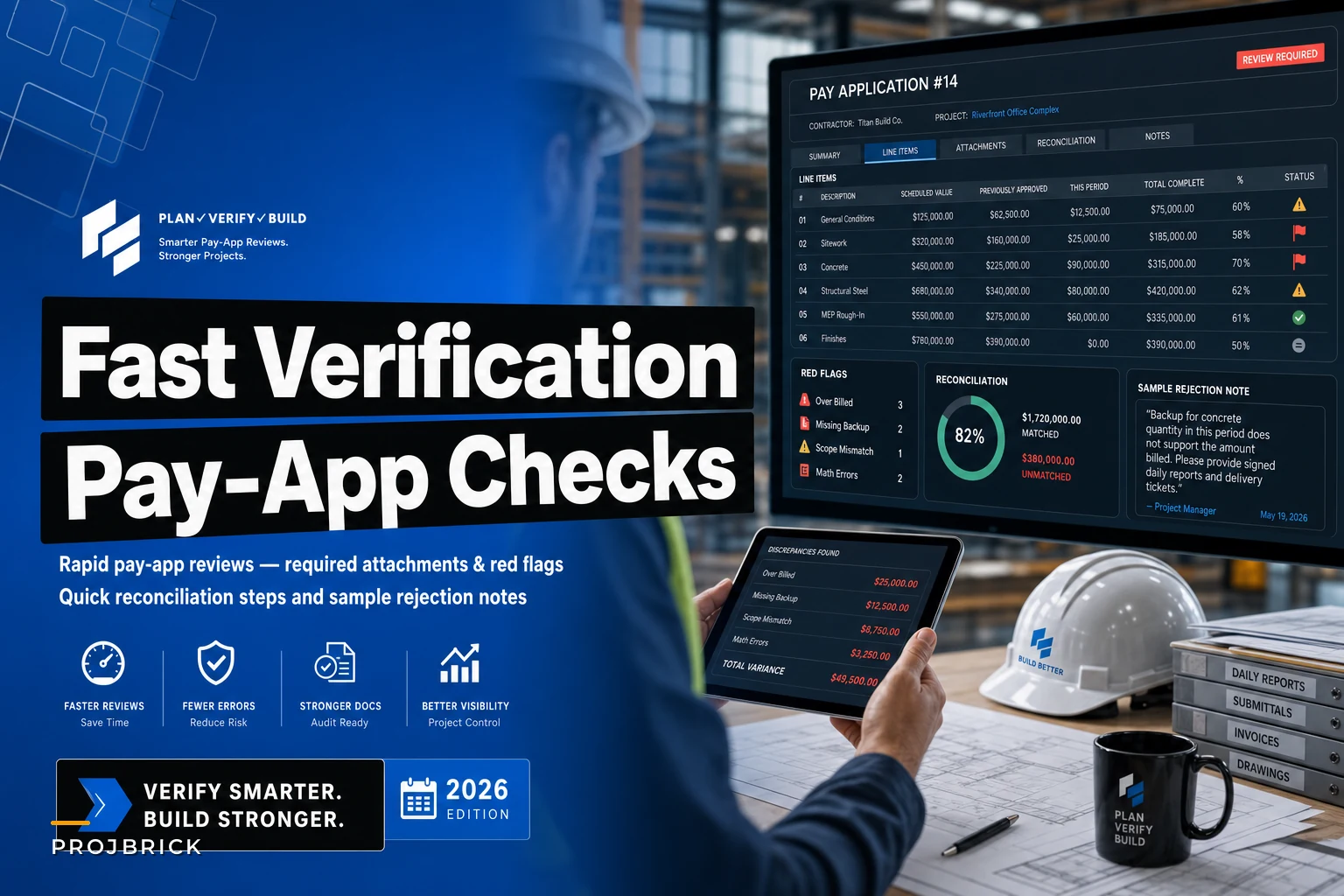

Payment application verification eats roughly 8–12 hours of every PM's week during busy months. You get stacks of invoices, progress reports, lien waivers, and change orders that need cross-checking against field logs, contracts, and previous pay apps. Miss something and you either overpay a sub by thousands or kick off a payment dispute that ripples through the whole project schedule.
The worst part? Most PMs develop their own messy system—highlighters, sticky notes, memory. Then someone covers while you're on vacation, can't follow your process, and either approves something they shouldn't or rejects something valid and creates unnecessary friction with a sub you actually rely on.
Certain patterns show up consistently across construction projects. The subs who always submit clean packages. The ones who routinely try to slip extras through. The specific documents that predict future disputes. The reconciliation steps that catch most errors before approval. This post is about those patterns.
Why payment verification becomes a bottleneck
The core problem is that verification requires comparing multiple data sources that don't live in the same place. Field logs in one system. Contracts and change orders in another. Previous pay apps buried in a filing cabinet or scattered across email threads. Delivery tickets with the field team. Time sheets with the super.
Then you need to verify claimed percentages against actual field progress. A drywall sub claims 75% complete on floor 3, but the super's daily reports show they just started taping yesterday. An electrical contractor bills for 200 feet of conduit that hasn't arrived on site yet according to delivery logs.
The reconciliation takes forever because you're manually comparing line items across documents. Schedule of values shows $45,000 for rough-in work. Current application bills $33,750 claiming 75% complete. Previous applications already paid $22,500. Quick math says you owe $11,250—but then you spot a change order that modified the rough-in scope by $3,200. Now you're recalculating everything from scratch.
Meanwhile, subs are calling about payment status. Accounting is pushing you to approve faster so they can cut checks. The owner wants detailed backup for every approval. Every interruption breaks your concentration and increases the chance you miss something.
The red flags that predict payment disputes
Certain warning signs show up consistently in problematic payment applications. Not every red flag means automatic rejection, but they tell you where to dig deeper.
Keep your construction projects on schedule and budget.
Projbrick helps you plan, track, and manage every project phase with precision and ease.
- Real-time project tracking
- Resource & budget management
- Team collaboration tools
No credit card required
Documentation mismatches:
-
Invoice date doesn't match pay period
-
Work descriptions differ between invoice and schedule of values
-
Quantities vary between backup documents
-
Math errors in subtotals or retention calculations
-
Missing required attachments like certified payroll or material tickets
Progress claim patterns:
-
Billing for materials not yet delivered to site
-
Front-loading early pay applications beyond reasonable mobilization
-
Claiming completion on work your field team hasn't inspected
-
Sudden jumps in percent complete without corresponding field progress
-
Billing stored materials without proper documentation or photos
Contractual violations:
-
Work performed without approved change order
-
Billing rates different from contract terms
-
Incorrect retention percentage applied
-
Missing lien waivers from previous payments
-
Expired or inadequate insurance certificates
| Category | Examples |
|---|---|
| Documentation mismatches | Invoice date doesn't match pay period; Work descriptions differ between invoice and schedule of values; Quantities vary between backup documents; Math errors in subtotals or retention calculations; Missing required attachments like certified payroll or material tickets |
| Progress claim patterns | Billing for materials not yet delivered to site; Front-loading early pay applications beyond reasonable mobilization; Claiming completion on work your field team hasn't inspected; Sudden jumps in percent complete without corresponding field progress; Billing stored materials without proper documentation or photos |
| Contractual violations | Work performed without approved change order; Billing rates different from contract terms; Incorrect retention percentage applied; Missing lien waivers from previous payments; Expired or inadequate insurance certificates |
A mechanical contractor once submitted five consecutive pay apps with "arithmetic errors" that all somehow favored them by $2,000–$4,000 each. Individual mistakes happen. But patterns reveal intent. After requiring detailed backup and line-by-line verification, the errors mysteriously stopped.
Building your verification checklist
Initial screening (2 minutes):
-
Check pay app date falls within current billing period
-
Verify contractor name matches contract exactly
-
Confirm project number and location
-
Check signature present and authorized
-
Scan for obvious math errors or missing pages
Document verification (5 minutes):
-
Certified payroll reports attached and current
-
Material delivery tickets match billed quantities
-
Required lien waivers from previous period included
-
Insurance certificates current and coverage adequate
-
Change order backup for any modifications
-
Photos documenting stored materials if applicable
Progress verification (10 minutes):
-
Compare claimed percentages against field reports
-
Cross-check with superintendent's daily logs
-
Review inspection reports for completed work
-
Verify materials on site for "delivered" items
-
Confirm stored materials properly secured and documented
Financial reconciliation (15 minutes):
-
Previous payments match your records
-
Current billing aligns with schedule of values
-
Change orders properly incorporated
-
Retention calculated correctly
-
Materials markup matches contract terms
-
Sum of line items equals invoice total
The sequence matters because you catch basic errors immediately. No point spending 20 minutes reconciling numbers if the pay app is for the wrong project or missing required documents.
Quick reconciliation techniques that save hours
Standard reconciliation means manually comparing every line item across multiple documents. These techniques speed that up without sacrificing accuracy.
The summary comparison method:
Instead of line-by-line checking, first compare major category totals. If "Electrical Total" matches between the pay app and your tracking, you can spot-check details rather than verify every circuit. On clean submissions, this alone cuts verification time significantly.
Previous payment validation:
Keep a running summary of previously approved amounts by category. When the new pay app arrives, you only need to verify the current period's work rather than recalculating entire payment history. One spreadsheet template handles this automatically once the formulas are set up.
Percentage threshold checks:
Set maximum percentage increases between pay periods. If rough carpentry jumped from 20% to 65% complete in two weeks, that triggers detailed verification. A move from 45% to 52% on a steady-progress trade probably checks out with a quick field confirmation.
Field report matching:
Pull the superintendent's completion percentage from the most recent report. If it's within 5% of what the sub claims, you can approve with minimal additional checking. Larger variances need documentation of what specifically got done since that report.
A concrete sub recently claimed 90% complete on slab work when the super's report from two days prior showed 75%. The 15% jump looked aggressive—until we checked the daily logs and found they'd run double crews over the weekend to stay on schedule. Photos confirmed it. Without the threshold check, we might have wrongly delayed their payment.
Sample rejection templates that maintain relationships
Rejecting a pay app creates tension, but vague rejections like "incorrect documentation" or "doesn't match field progress" just create more confusion and delay. Specific language about what's wrong and what's needed keeps things moving.
Missing documentation rejection:
"Your pay application #[NUMBER] dated [DATE] cannot be processed due to missing required attachments. Please resubmit with:"
-
Certified payroll for weeks ending [DATES]
-
Conditional lien waiver from [PREVIOUS PERIOD]
-
Updated insurance certificate (current expired [DATE])
Once complete documentation is received, we'll process within 48 hours.
Math error rejection:
"Pay application #[NUMBER] contains calculation errors requiring correction:"
-
Line 23
$[AMOUNT] × [PERCENTAGE]% should equal $[CORRECT AMOUNT], not $[SUBMITTED AMOUNT]
-
Retention
[PERCENTAGE]% of $[AMOUNT] equals $[CORRECT], not $[SUBMITTED]
-
Previous payments total $[CORRECT AMOUNT] per our records, not $[SUBMITTED AMOUNT]
Please revise and resubmit. Contact me if you need copies of previous payment records.
Progress dispute rejection:
"Pay application #[NUMBER] shows [WORK ITEM] at [PERCENTAGE]% complete. Field verification on [DATE] indicates approximately [ACTUAL]% complete based on:"
-
[SPECIFIC INCOMPLETE ITEMS]
-
[MEASURABLE MILESTONES NOT MET]
Please adjust percentage complete or provide documentation/photos showing additional progress. Happy to meet on-site tomorrow to review together.
Unauthorized work rejection:
"Pay application #[NUMBER] includes $[AMOUNT] for [WORK DESCRIPTION] not covered under current contract or approved change orders. Please either:"
-
Remove this item from current pay application, or
-
Submit change order request with backup for review
Remaining approved items total $[AMOUNT] and can be processed immediately upon receiving a revised application.
These templates work because they point to specific problems, give clear next steps, and don't make the sub feel like they're being accused of something. That matters for keeping good relationships intact.
Converting your checklist into systematic operations
Most PMs treat each payment application as its own event. That's where the chaos comes from. Systemizing the verification process reduces both time and errors significantly.
Start with a standard folder structure for each project—subfolders for contracts, change orders, previous pay apps, and field reports. When everything lives in predictable locations, verification becomes muscle memory instead of a scavenger hunt.
Track patterns across subcontractors in a simple spreadsheet. Who consistently submits clean packages. Who always has math errors. Who tries to front-load. That historical data helps you prioritize—spend minimal time on reliable subs, deep-dive the ones who've given you problems before.
Your procurement schedule already tracks material deliveries, so cross-reference those dates against applications claiming delivered materials. If structural steel isn't arriving until next Tuesday according to your procurement tracking, the fab shop shouldn't be billing for it this Friday.
Your project planning framework also gives you expected completion percentages by phase. When a sub's pay app shows progress significantly ahead or behind those benchmarks, you know exactly where to dig.
Modern construction operations software can centralize this entire workflow. Instead of hunting through emails and folders, contracts, change orders, field reports, and previous payments all live in one searchable system. AI-powered platforms can handle the math verification, flag unusual billing patterns, and surface discrepancies that would take a PM an hour to catch manually. What typically takes 8–12 hours a week can drop to 2–3 hours of actual decision-making.
Track subcontractor submission quality in a simple spreadsheet so you can prioritize review time.
Here’s a simple visual of a systemized verification workflow.
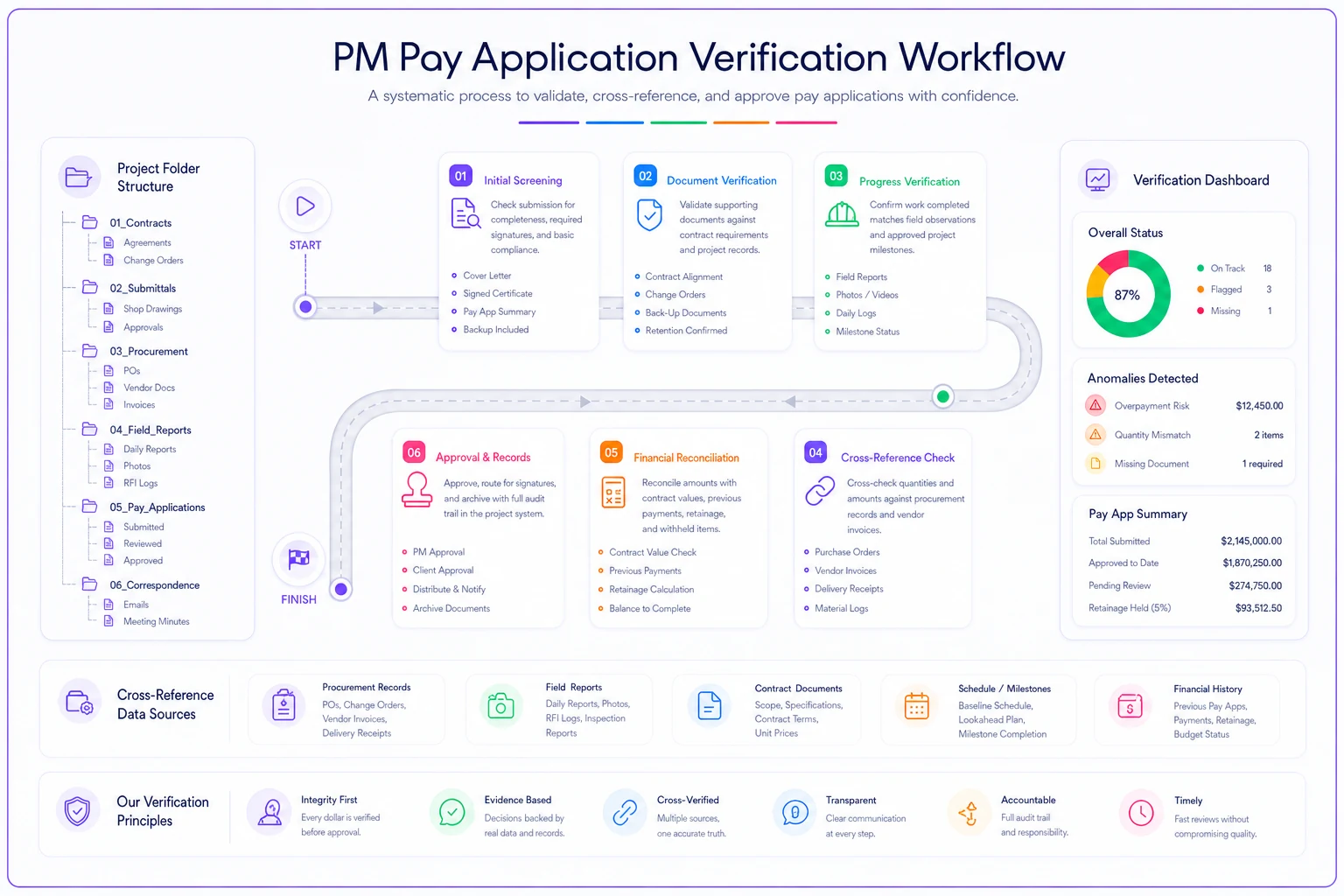
What typically takes 8–12 hours a week can drop to 2–3 hours of actual decision-making.
The monthly close becomes predictable
Payment application chaos peaks at month-end when every sub rushes to submit before the cutoff. With systematic verification, even busy billing periods become manageable. The checklist catches obvious errors early. The reconciliation techniques speed up number-checking. The rejection templates eliminate extended back-and-forth. The pattern tracking tells you which subs need extra scrutiny before you even open their package.
One PM mentioned their payment verification dropped from consuming entire Saturdays to just Friday afternoons—not because they were processing fewer pay apps, but because systematic verification eliminated the redundant checking and confusion about what actually needed review. Their subs started submitting cleaner packages too, because the specific rejection notes made it clear what documentation was actually required.
Payment applications will always require careful verification. Too much money at stake to rubber-stamp approvals. But the difference between chaotic manual checking and a real system is measured in hours saved weekly and thousands in prevented overpayments. Once the process is built, verification becomes just another predictable part of project operations rather than a recurring nightmare every billing cycle.
Ready to build smarter and faster?
Join 2,000+ construction teams using Projbrick to improve project visibility, reduce delays, and increase profitability.