

Most project controls shortlists get built the wrong way. Someone pulls together a spreadsheet of fifteen vendors, checks off "has scheduling," "has budgeting," "has mobile app," and picks whoever gave the slickest demo. Six months into a modular program, the cracks show: the platform tracks schedule and cost fine, but has no concept of a factory acceptance checkpoint, no way to tie a module's install gate to the field photo proving it arrived undamaged, and no clean handoff to the ERP that finance actually lives in.
That gap — between generic project controls and prefab-aware project controls — is what this guide is about. Prefabrication breaks the assumption that work happens where you can see it. A panelized wall assembly gets fabricated in a shop two states away, shipped on a specific truck, staged in a specific zone, and installed in a specific window. Your controls stack has to govern all of that, and it has to capture evidence at each transfer of custody — because when a module shows up cracked or a dimension is off, the argument about who pays happens weeks later, and the only thing that settles it is what you captured in the moment.
So this is not a "best construction software" list. It's a narrow shortlist of five platforms evaluated against one specific question: can this tool govern a prefab/modular program end to end, including mobile field evidence, and not fall apart at the integration boundaries with ERP, Primavera/MSP, and your BIM source?
If you're earlier in your tooling journey and still building out your controls discipline, it's worth pairing vendor selection with an honest look at where your organization sits on the construction governance maturity model for scaling PMO controls — buying enterprise controls for a team that can't yet run a disciplined pull plan is money lit on fire.
How these five were scored
Every platform below was evaluated against six dimensions that matter specifically for prefab governance, not generic PM features:
-
Integrated controls depth — does schedule, budget, and change management share one data model, or are they bolted-together modules that reconcile overnight?
-
Prefab/modular governance — explicit support for factory acceptance checkpoints, delivery sequencing tied to install gates, and multi-site install tracking.
-
Mobile field evidence — timestamped, geotagged, offline-capable capture that links to a schedule activity or budget line, not just a photo dumped in a folder.
-
Integration reality — honest assessment of how well it talks to ERP (Sage, Viewpoint, SAP), scheduling engines (Primavera P6, MS Project), and BIM (Revit, Navisworks, IFC).
-
Organizational fit — who it actually serves without being overkill or underpowered.
-
Change traceability — when a prefab element drives a change, does the cost and schedule impact flow through automatically or does someone re-key it?
A quick orientation table, then the detail:
| Platform | Best fit | Prefab governance strength | Mobile evidence | Integration friction |
|---|---|---|---|---|
| Autodesk Construction Cloud | Mid-market to enterprise GCs, owners | Strong (model-linked assemblies) | Strong | Moderate — ERP needs connectors |
| Procore | Small GC to mid-market, scaling fast | Moderate, improving | Very strong | Low-moderate, broad marketplace |
| InEight | Enterprise GCs, capital programs | Strong (deep P6 ties) | Strong | Low with P6, heavier lift elsewhere |
| ALICE / Optioneering-type schedulers | Enterprise, complex sequencing | Specialized (scenario-based) | Weak alone — pairs with others | Needs a controls partner |
| Fieldwire + controls stack | Small GC, subcontractors, prefab shops | Field-focused, task-level | Very strong | Lightweight, limited deep controls |
Now the part that actually helps you choose.
1. Autodesk Construction Cloud (ACC)
What they do best: The model-to-field thread. ACC's differentiator for prefab is that assemblies can be tracked as model objects, so a modular unit isn't just a line on a schedule — it's an element with geometry, properties, and a status that moves from "designed" to "released to fab" to "delivered" to "installed." For teams already authoring in Revit, that continuity removes a significant re-keying burden.
Keep your construction projects on schedule and budget.
Projbrick helps you plan, track, and manage every project phase with precision and ease.
- Real-time project tracking
- Resource & budget management
- Team collaboration tools
No credit card required
Where it fits: Mid-market GCs and up, plus owners who want a model that survives into operations. Smaller GCs can use the field modules, but you're paying for a platform whose real value shows up when BIM is central to how you build.
Prefab/modular workflows supported: Design-release gating, assembly status tracking tied to model objects, and installation verification against the coordinated model. The factory-acceptance side is lighter natively — many teams run shop QA in a connected tool and surface the acceptance status back into ACC rather than running it inside.
Mobile field evidence: Strong. Field reports, issues, and photos link to model locations and specific assemblies, which is exactly what you want when proving a module installed per the coordinated design. Offline capture works; sync behavior on large models needs testing on your actual devices before go-live.
Integration constraints: BIM is the home turf — Revit, Navisworks, IFC all land cleanly. Scheduling integration with P6 exists but is not as native as InEight's. ERP is the friction point: expect to stand up connectors for Sage/Viewpoint/SAP and budget real time for that mapping work.
Watch for: Licensing complexity and the temptation to buy more modules than your team can actually operationalize.
2. Procore
What they do best: Breadth and field adoption. Procore's strength isn't that any single prefab feature is the deepest on the market — it's that your superintendents and foremen will actually use it, and the integration ecosystem is enormous. For a scaling GC, adoption beats theoretical depth every time.
Where it fits: Small GCs growing into mid-market, and mid-market firms that want one platform their whole team touches. Owners use it, but it really shines contractor-side.
Prefab/modular workflows supported: Procore handles prefab through its project and quality workflows rather than a dedicated modular governance module. You can configure delivery tracking, inspection checklists for factory acceptance, and install sign-offs — but you're configuring it, not inheriting it pre-built. Teams running serious volume typically build a prefab template with custom tools and inspection forms that somebody has to maintain.
Mobile field evidence: Very strong, arguably the best field UX on this list. Offline capture, photo markup, timestamped observations, and inspection workflows that field crews don't resist. If your prefab program depends on crews actually documenting deliveries and installs in the moment, that adoption advantage is worth real money.
Integration constraints: The broad marketplace covers most ERPs and BIM sources at a usable level. Depth of each connector varies — accounting syncs are mature, BIM coordination is serviceable but not as model-native as ACC. P6 integration is available but many Procore shops run scheduling elsewhere and reconcile manually.
Watch for: Cost scaling with usage, and the risk of configuring prefab workflows loosely enough that governance quietly erodes over time.
3. InEight
What they do best: Deep, disciplined controls for large capital work. InEight was built for the world where Primavera P6 is the scheduling backbone and cost control is non-negotiable. For a prefab program embedded in a large capital portfolio, the schedule and cost integrity is the differentiator.
Where it fits: Enterprise GCs and owners running capital programs. This is overkill — and overspend — for a small GC doing occasional modular work.
Prefab/modular workflows supported: Strong on the controls side of prefab: tying fabrication milestones into the integrated schedule, forecasting cost impact of fab delays, and governing change with full traceability back to budget. Factory acceptance and multi-site install gates are modeled as schedule and quality activities with rigorous progress tracking.
Mobile field evidence: Strong for progress and inspection capture tied directly to controls. The field experience is more controls-oriented than Procore's — powerful, but your field team needs real onboarding time, not a 20-minute walkthrough.
Integration constraints: P6 integration is a genuine strength, not a checkbox. ERP integration is robust at the enterprise tier. BIM connectivity exists but model-native workflows aren't the core story — if BIM is your center of gravity, pair it with ACC or lean ACC-primary.
Watch for: Implementation weight. This is a commitment, not a pilot you spin up in two weeks.
4. ALICE and scenario-based schedulers
What they do best: Sequencing optimization for complex, repetitive, or heavily modular builds. Where the others govern the schedule you already have, this class of tool helps you find a better schedule — running through sequencing scenarios to show how changing module delivery order or crane-lift windows compresses the program.
Where it fits: Enterprise teams with genuinely complex sequencing problems — high-rise modular, repetitive structures, tight crane-constrained sites. Not a standalone controls platform.
Prefab/modular workflows supported: This is its home. Modular install sequencing, crew and equipment constraint modeling, and delivery-window optimization are exactly what it's for. It answers "what's the best way to stack these modules given our constraints" — which the other platforms assume you've already figured out.
Mobile field evidence: Weak on its own, but that's not its job. You pair it with one of the platforms above for execution, evidence, and cost control. Treat it as the sequencing brain, not the system of record.
Integration constraints: It needs a controls partner. Expect to export optimized schedules into P6 or your platform of record, which means owning the handoff carefully so the optimized plan doesn't drift from what actually gets executed in the field.
Watch for: Buying it without a clear plan for how the optimized sequence survives contact with reality.
5. Fieldwire paired with a lightweight controls stack
What they do best: Task-level field execution and evidence, fast to adopt and inexpensive to run. For prefab shops and smaller GCs, Fieldwire nails the ground-level reality: assigning install tasks, capturing photos against them, tracking punch, doing it on devices in minutes with near-zero training.
Where it fits: Small GCs, specialty subcontractors, and fabrication shops themselves. If you're a prefab supplier who needs to prove factory acceptance and delivery condition without a heavyweight platform, this is a pragmatic starting point.
Prefab/modular workflows supported: Task-level factory QA checklists, delivery condition capture, and install task tracking. It won't give you integrated cost forecasting or deep change traceability on its own — you layer a budgeting and controls tool on top for that.
Mobile field evidence: Very strong at the task level. Plans, markups, photos, and task-linked documentation work offline and sync cleanly. For evidence that holds up in a later dispute, it captures the moment well.
Integration constraints: Lightweight by design. It connects to common tools but isn't pretending to be your ERP bridge or P6 engine. That's a feature for small teams and a real limitation for enterprise portfolios.
Watch for: Outgrowing it. Teams that scale prefab volume eventually need the integrated controls Fieldwire deliberately doesn't provide, and retrofitting that transition mid-program is painful.
A realistic selection scenario
A mid-market GC — roughly $180M annual revenue, three concurrent projects with panelized exterior wall assemblies fabricated off-site — went through this exact shortlist. Their problem wasn't a lack of software; they already had Procore for field and a separate P6/ERP setup for controls. The pain was the seam between them: when a panel showed up with a fabrication defect, the field team logged it in Procore, but the cost and schedule impact lived in a controls world that nobody updated for days.
Change orders tied to prefab defects were landing two to three weeks late. On one project, that lag contributed to somewhere in the $90k–$120k range of disputed back-charges that were hard to defend because the evidence and the cost record lived in completely different systems.
They didn't rip everything out. They kept Procore because crews were already in it, tightened the prefab inspection template so factory acceptance and delivery-condition photos were mandatory before a panel could be marked received, and invested in a cleaner connector between field-captured issues and their cost forecasting. The scenario-scheduler conversation got shelved — their sequencing wasn't complex enough to justify it. Within a couple of reporting cycles, prefab-driven changes were flowing into the cost forecast in days instead of weeks, and the disputed back-charge exposure on the next project dropped noticeably because the evidence chain actually lined up with the change record.
The lesson wasn't "buy the biggest platform." It was: diagnose the seam that's actually hurting you, then buy to close that seam.
When each choice actually makes sense
Go ACC-centric when BIM is genuinely how you build and your prefab elements originate in the model. The model-to-field continuity pays for itself; without a real BIM practice behind it, you're paying for capability you won't use.
Go Procore-centric when field adoption is your biggest risk and you need one platform the whole team touches. Accept that prefab governance will be configured rather than inherited, and resource someone to keep that configuration from drifting.
Go InEight when you're running capital-scale work where P6 and rigorous cost control are already the backbone. Don't go here for a small or occasional modular program — the implementation weight will crush the value.
Add a scenario scheduler only when your sequencing complexity is real and someone owns the optimized-plan-to-execution handoff. Buying it without that ownership wastes the investment.
Stay with Fieldwire plus a light stack when you're small or you're the fab shop, and your priority is clean, defensible field evidence on a reasonable budget. Plan your upgrade path before volume forces it on you.
Who should NOT over-buy here
If your organization can't yet run a reliable lookahead and your field team doesn't consistently capture evidence today, no platform fixes that. Tooling amplifies the discipline you already have — it doesn't manufacture it.
Start by locking a simple lookahead and evidence-capture rhythm before investing in enterprise controls.
A team buying enterprise controls to compensate for immature process usually ends up with an expensive system nobody fully uses and a prefab program governed by the same spreadsheets as before, just more expensively. Get the operating rhythm working at a basic level first, then buy the tool that scales it.
The downloadable artifacts
Three working documents to make this actionable:
-
Vendor comparison matrix — the full feature checklist across all six scoring dimensions with weighted scoring you can adjust to your priorities, so a BIM-heavy owner and a field-adoption-focused GC reach different, defensible answers.
-
Prefab field-evidence workflow template — the capture sequence from factory acceptance through delivery condition to install sign-off, with the exact fields, photo protocols, and gate criteria that make evidence hold up when a change gets disputed later.
-
Procurement checklist for PMOs moving pilot → scale — the questions to ask in demos, the integration tests to run before signing, and the rollout gates that stop a successful pilot from dying in a messy enterprise deployment.
Here's a simple visual you can use alongside the field-evidence template.
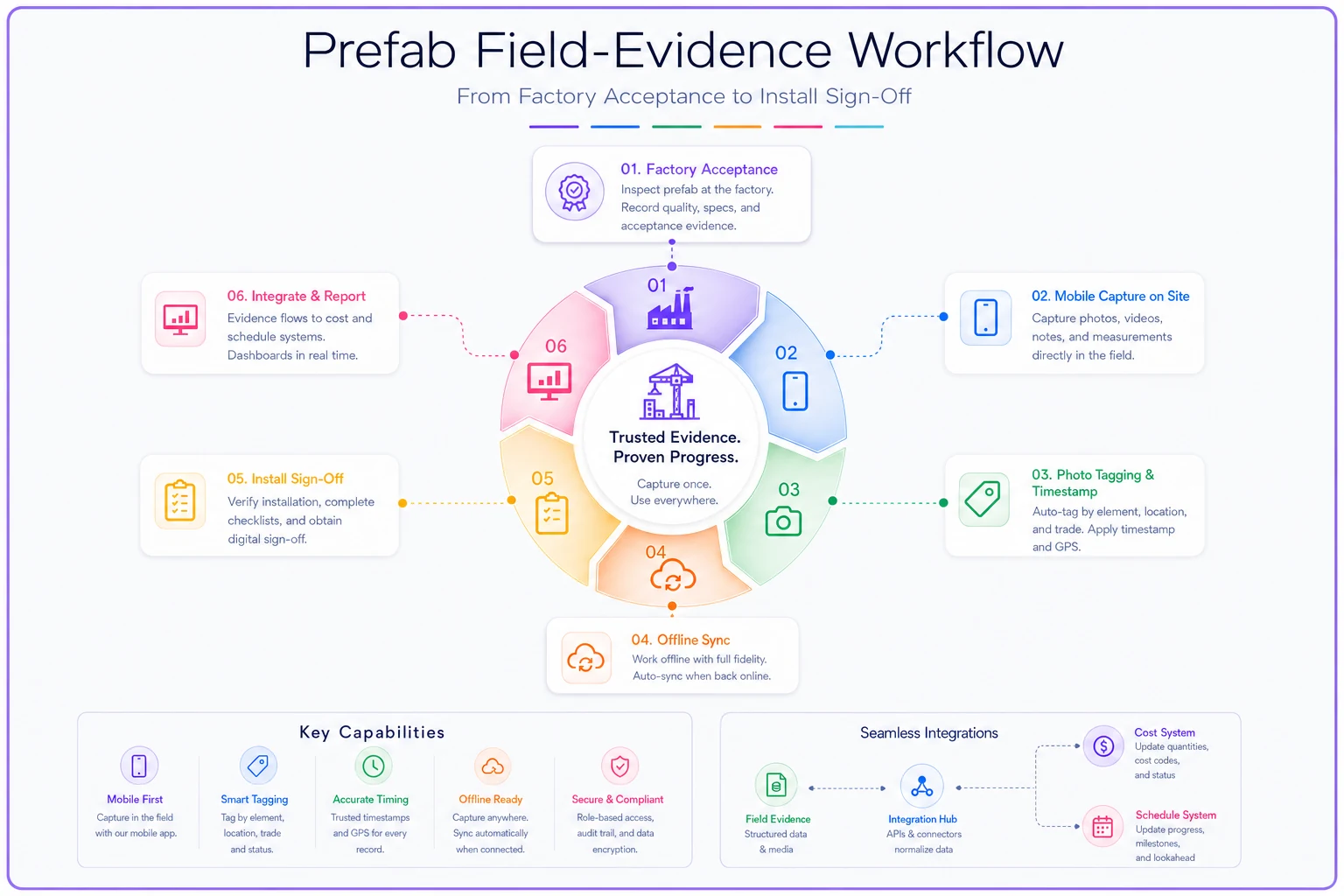
Use the visual to walk stakeholders through the capture sequence and where integrations need to hand off data.
Bottom line for your shortlist
The mistake worth avoiding is treating prefab governance as a feature checkbox instead of a seam between fabrication, field evidence, and integrated controls. The five platforms here each close that seam differently — ACC through the model, Procore through adoption, InEight through controls rigor, scenario schedulers through sequencing, and Fieldwire through lightweight field capture.
The right pick depends less on which vendor wins a feature-count contest and more on where your program actually breaks today, and whether your team's controls discipline is mature enough to use what you're buying. Diagnose the seam, weight the scoring against your actual priorities, and run a pilot with real prefab elements before you commit at scale.
The right pick depends less on which vendor wins a feature-count contest and more on where your program actually breaks today, and whether your team's controls discipline is mature enough to use what you're buying. Diagnose the seam, weight the scoring against your actual priorities, and run a pilot with real prefab elements before you commit at scale.
Ready to build smarter and faster?
Join 2,000+ construction teams using Projbrick to improve project visibility, reduce delays, and increase profitability.