



Most construction project managers track crew productivity the same broken way: foremen scribble numbers on paper forms, those forms pile up in the trailer, someone eventually enters them into a spreadsheet, and by the time anyone notices productivity dropping, you're already two weeks behind schedule. The crazy part? Those same foremen are actually collecting solid data every single day. They know exactly how many linear feet of pipe got installed, how many cubic yards got poured, which crews are hitting targets. The problem isn't the data collection — it's that nobody converts those daily observations into something you can actually use to prevent delays.
The productivity tracking gap that kills construction schedules
Here's what happens on most job sites. Your concrete crew lead writes down "42 yards poured" on Tuesday's report. Your framing crew marks "8,200 sq ft completed" on their weekly summary. The excavation team notes they moved "approximately 850 cubic yards" over three days.
These numbers sit in different formats, different systems, sometimes different languages if you're running multilingual crews. By Friday, when someone finally compiles everything into the master schedule spreadsheet, those numbers are already stale. More importantly, nobody's comparing Tuesday's 42 yards against what you actually needed to pour to stay on schedule. Nobody's calculating whether 8,200 square feet of framing in a week means you'll hit your milestone or miss it by six days.
The real killer? Your field crews are often the first to sense when something's off. The concrete foreman knows his crew's only managing 35 yards per day instead of their usual 45 because of the new mix design. The framing lead sees his productivity dropping because half his crew keeps getting pulled to help with punch list items. But without a system to capture these observations and turn them into projections, that knowledge stays locked in their heads.
Why manual tracking creates false confidence
Construction managers love their Excel trackers. Color-coded cells, formulas linking across twelve worksheets, charts that update automatically — assuming someone remembers to input the data correctly. The sophistication of these spreadsheets creates a dangerous illusion of control.
Keep your construction projects on schedule and budget.
Projbrick helps you plan, track, and manage every project phase with precision and ease.
- Real-time project tracking
- Resource & budget management
- Team collaboration tools
No credit card required
Walk into any construction trailer and you'll find at least three different tracking systems running parallel. The superintendent has his personal notebook where he tracks real progress. The project manager maintains the official spreadsheet that gets sent to ownership. The scheduling software shows something completely different because nobody's updated it since week two.
Each system tells a slightly different story. The superintendent's notes show you're behind on mechanical rough-in. The PM's spreadsheet says you're on track because it's using planned percentages instead of actual field counts. The scheduling software thinks you're ahead because someone accidentally marked an entire phase complete when they meant to update a single task.
Meanwhile, the data that actually matters — daily crew productivity rates, actual units completed per hour, real material consumption rates — gets averaged out, rounded up, or lost entirely in the translation between paper forms and digital tracking.
Real field data that prevents schedule disasters
Productivity tracking isn't about micromanaging crews or generating reports for corporate. It's about catching problems while you can still fix them cheaply.
Take earthwork operations. Your excavation crew typically moves 400 cubic yards per day with their current equipment setup. Last Monday they moved 380. Tuesday was 365. Wednesday dropped to 340. That's not random variation — something's degrading. Maybe it's equipment issues, maybe the soil conditions changed, maybe your best operator is training a rookie.
Without daily tracking that converts these numbers into trends, you don't see the pattern until you're a thousand yards behind schedule and scrambling to add a second crew at overtime rates.
These gradual degradations show up across every trade:
-
Drywall crews gradually slowing from 3,000 to 2,400 square feet per day as they hit more complex room layouts
-
Concrete pours taking 20% longer per yard as temperatures drop and the mix needs more working time
-
Electrical rough-in productivity halving when you hit areas with existing utilities that weren't on the as-builts
None of these are sudden failures. They're slow declines that daily tracking would catch in time to adjust resources, modify schedules, or push back on unrealistic deadlines.
Building a daily data capture system that crews will actually use
The first rule of field data capture: if it takes more than two minutes, it won't happen consistently. Foremen aren't data entry specialists. They're managing crews, solving problems, coordinating with other trades. Your tracking system needs to work with their workflow, not against it.
Start with the absolute minimum data points that actually drive decisions:
Daily Production Metrics
-
Units completed (linear feet, square feet, cubic yards, whatever your trade measures)
-
Crew size (actual bodies on site, not scheduled)
-
Hours worked (including any overtime)
-
Primary activity (what they actually did, not what was planned)
Resource Consumption
-
Materials used (basic counts, not detailed inventory)
-
Equipment hours (for rented or owned equipment tracking)
-
Subcontractor headcount (if managing subs)
Issues and Delays
-
Work stoppage time (rounded to nearest 15 minutes)
-
Cause category (weather, materials, coordination, rework, etc.)
-
Impact assessment (completed less work, need additional resources, pushed to tomorrow)
That's it. Fifteen data points maximum that a foreman can input in under two minutes on a phone app or paper form. Everything else — calculated productivity rates, trending analysis, forecast adjustments — happens automatically in your back-end system.
A simple flow from field note to forecast:
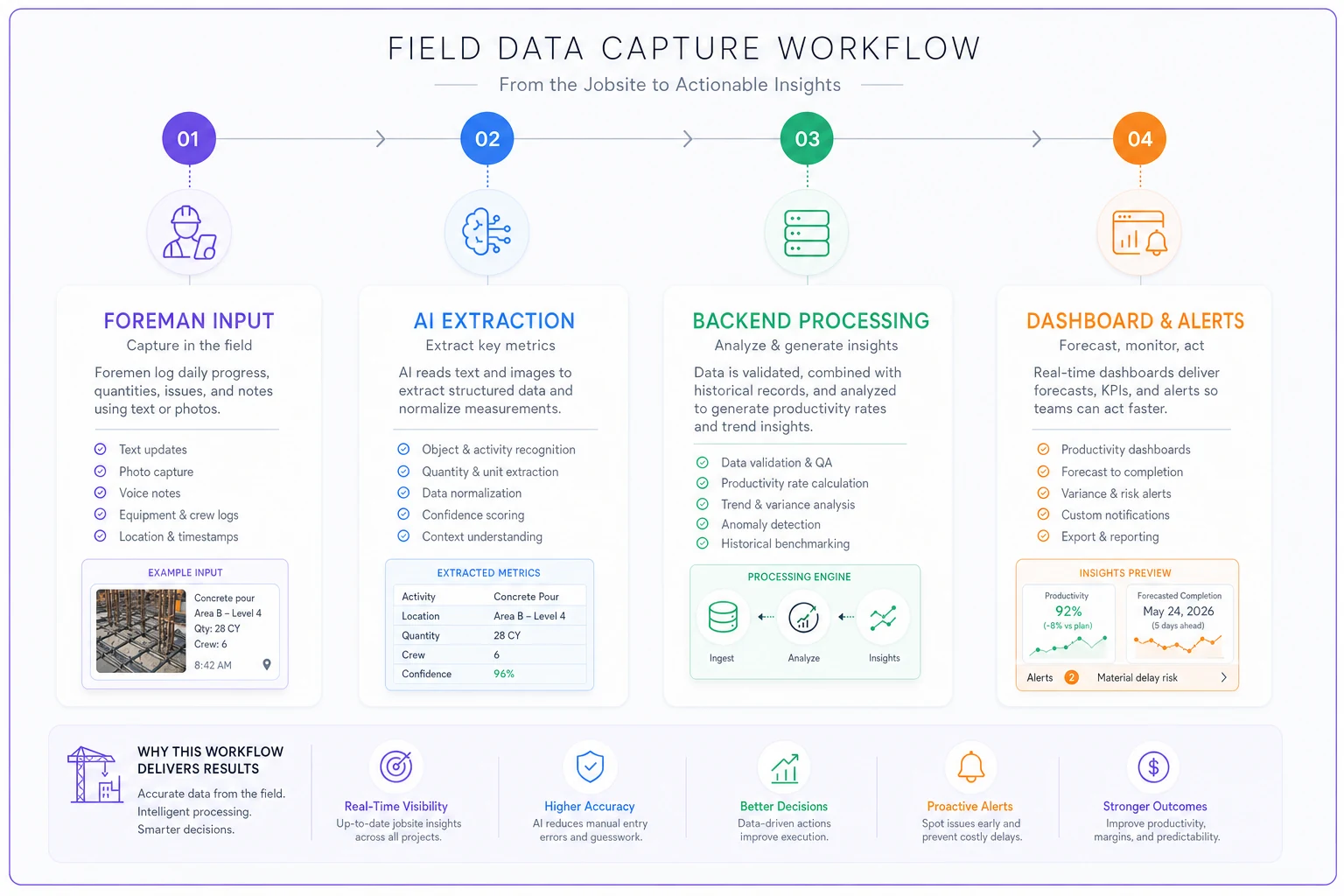
Everything else — calculated productivity rates, trending analysis, forecast adjustments — happens automatically in your back-end system.
Converting daily numbers into weekly forecasts
Raw production numbers mean nothing without context. Installing 200 linear feet of pipe might be great for a two-man crew in tight spaces or terrible for a six-man crew in open trenches. The magic happens when you convert absolute numbers into productivity rates and trend those rates over time.
Here's a practical framework that actually works:
Calculate baseline productivity rates
-
Take your last three days of clean production (no major delays or issues) and calculate:
-
- Units per crew-hour (total units ÷ total hours worked)
-
- Units per day per person (total units ÷ crew size ÷ days)
-
- Material consumption rate (materials used ÷ units completed)
Track variance from baseline
-
Each day, calculate how current productivity compares to your baseline
-
- Today's rate vs. 3-day average
+5% means improving, -5% means degrading
-
- This week vs. last week
longer trend to filter out daily noise
-
- Current phase vs. previous similar phase
apples-to-apples comparison
Project forward based on trends
-
Calculate tomorrow's expected output
Today's actual × 0.98
-
Estimate next week's capacity
Current weekly rate × (0.98^7)
-
Determine days to milestone
Remaining units ÷ projected daily rate
This isn't complex math — it's basic trending that any spreadsheet can handle. The power comes from doing it daily instead of waiting until you're already behind.
Leading indicators that predict problems before they hit
Most construction KPIs are lagging indicators. Percentage complete, costs to date, schedule variance — they all tell you what already happened. By the time these metrics flash red, you're already in recovery mode.
Daily crew productivity tracking reveals leading indicators that predict problems while you still have time to act. A few patterns worth watching:
Declining productivity rate with stable crew size. When the same crew produces less each day, something's degrading. Could be fatigue, could be increasing complexity, could be equipment problems. The specific cause matters less than catching the trend early.
Increasing rework percentage. Track how many units get completed versus how many pass inspection. If your framers are building 1,000 square feet per day but 200 square feet needs rework, your real productivity is 800. When that rework percentage starts climbing, quality problems are coming — and they'll cascade through the trades behind you.
Material consumption creeping up. If your concrete crews are suddenly using 10% more material per yard placed, something's wrong. Maybe forms are leaking, maybe someone's over-ordering to avoid shortages, maybe there's waste you're not seeing. Either way, it's costing money and probably slowing production.
Overtime hours increasing without production gains. When crews start working longer hours but daily output stays flat, you're hitting the fatigue wall. Productivity is about to crater, quality issues are coming, and someone's probably going to get hurt.
Sample calculations for real field scenarios
Concrete pour productivity tracking
| Day | Yards | Crew Size | Hours | Yards/Crew-Hour |
|---|---|---|---|---|
| Week 1 Monday | 38 | 6 | 8.0 | 0.79 |
| Week 1 Tuesday | 44 | 6 | 9.0 | 0.81 |
| Week 1 Wednesday | 41 | 6 | 8.5 | 0.80 |
| Baseline | 0.80 | |||
| Week 2 Monday | 36 | 6 | 8.5 | 0.70 |
| Week 2 Tuesday | 33 | 6 | 8.0 | 0.69 |
| Week 2 Wednesday | 35 | 6 | 9.0 | 0.65 |
Trend calculation:
-
Daily decline rate
roughly 3% per day
-
Projected Thursday output
35 × 0.97 = 34 yards
-
Days to 500-yard milestone at current trend
18 days instead of planned 14 days
Decision trigger: Productivity dropped about 19% from baseline. Investigation reveals the new concrete mix requires more finishing time. Solution: add a finisher to the crew or adjust schedule expectations.
Framing productivity with weather impacts
Normal conditions baseline:
-
2,800 sq ft per day, 4-man crew
-
700 sq ft per day per person
-
Material waste
8%
Current week with weather delays:
-
Monday
2,400 sq ft (dry day)
-
Tuesday
800 sq ft (rain delays, 3 hours lost)
-
Wednesday
1,900 sq ft (wet conditions, slower work)
-
Thursday
2,200 sq ft (drying out)
Adjusted calculation:
-
Remove Tuesday's outlier from trending
-
Effective productivity
~2,166 sq ft per day
-
Recovery rate
gaining roughly 150 sq ft per day as conditions improve
-
Projected return to baseline
4 more days
Schedule impact: 3-day delay on framing completion
When daily tracking actually helps (and when it's overkill)
Not every project needs granular daily tracking. A two-week residential renovation doesn't need the same rigor as an 18-month commercial build.
Daily tracking makes sense when:
-
Project duration exceeds 3 months
-
Multiple trades working simultaneously
-
Tight scheduling dependencies between phases
-
Penalties for late completion exceed $10k per day
-
Historical problems with specific trade contractors
-
Weather-sensitive operations during risky seasons
Simplified weekly tracking works when:
-
Projects under 6 weeks
-
Single trade or sequential work
-
Flexible completion dates
-
Owner-occupied spaces with understanding clients
-
Experienced crews doing repetitive work
The sweet spot for most commercial construction falls somewhere between: daily data collection with weekly analysis and bi-weekly forecast adjustments. This rhythm gives you enough data to spot trends without drowning in spreadsheets.
Dashboard mockups that turn numbers into decisions
A productivity dashboard isn't about pretty charts — it's about making problems impossible to ignore.
The Three-Panel Reality Check
-
Panel 1
Today vs. Plan
- Planned units: 500 sq ft drywall - Actual completed: 380 sq ft - Variance: -24% - Simple red/yellow/green indicator -
Panel 2
This Week's Trend
- Monday: 95% of target - Tuesday: 88% of target - Wednesday: 76% of target - Trend line showing degradation - Projected week-end achievement: 72% of plan -
Panel 3
Impact on Milestone
- Original milestone date: March 15 - Current projected date: March 19 - Cost impact: $12k in extended GC overhead - Decision needed: Add crew or accept delay
Strip away everything that doesn't drive immediate decisions. No historical comparisons to last year. No company-wide benchmarks. Just what's happening, where it's heading, and what it costs if you don't act.
Corrective actions triggered by data patterns
Data without action is just expensive record-keeping. The real value comes from establishing clear triggers that prompt specific responses. Not every variance needs intervention — construction is too variable for that. But certain patterns always require action.
Productivity decline over 3 consecutive days
-
Day 1–2
Monitor and document potential causes
-
Day 3
Foreman meeting to identify root cause
-
Day 4
Implement fix or escalate to PM
-
Day 5
If not improving, bring in additional resources
Material consumption exceeds plan by 15%
-
Immediate audit of installation methods
-
Check for unreported rework or waste
-
Verify material quality and specifications
-
Adjust future orders or investigate theft/loss
Crew consistently finishing early
-
Verify quality standards are being met
-
Consider advancing subsequent trades
-
Evaluate if crew can take on additional scope
-
Potentially reduce crew size to optimize costs
Weather delays exceeding 20% of work hours
-
Shift to interior work where possible
-
Adjust schedule to work longer days when clear
-
Consider weather protection systems
-
Renegotiate milestone dates with owner
The point isn't to replace human judgment — it's to make sure the right person knows about a problem while there's still time to fix it cheaply. Your foreman might already sense productivity is down, but without systematic tracking, the project manager doesn't find out until the monthly schedule update confirms you're behind.
Building this system without adding administrative burden
If your new tracking system adds more than five minutes to anyone's daily routine, it'll fail within two weeks. The construction industry runs on tight margins and tighter schedules. Nobody has time for elaborate data entry.
The solution isn't asking for less data — it's building smarter capture methods. Modern AI-powered operational software can extract productivity data from existing workflows. Your foremen are already texting updates, taking progress photos, updating daily logs. The right platform captures that information automatically and converts it into structured data.
For example, a foreman texts: "Finished 380 lf of 6" pipe today, Jimmy's crew, trenching was slower in the rocky section near building 2." An AI-assisted platform pulls out the production quantity, pipe size, crew lead, location, and the issue note — no forms, no dropdowns, no special apps. Natural communication that gets automatically structured into trackable metrics. The same approach works with photo analysis — AI can count installed fixtures, measure completed areas, even flag safety issues from regular progress photos.
Train foremen on the two-minute capture routine during toolbox talks so the habit becomes part of daily operations.
This isn't about technology for its own sake. It's about accepting that people won't change their behavior just to feed your tracking system. The system needs to adapt to how work actually happens in the field.
Turning forecasts into reliable commitments
The ultimate goal of daily crew productivity tracking isn't generating reports or catching problems — it's making reliable commitments to project owners. When you can predict completion dates based on actual field productivity rather than theoretical schedules, everything changes.
Owners stop calling daily for updates because they trust your projections. Subcontractors can plan their mobilization with confidence. Material suppliers can schedule deliveries based on real consumption rates rather than guesswork. The whole project ecosystem gets more predictable.
But this only works if your forecasts prove accurate over time. That means being honest about what the data shows, even when it's uncomfortable. If daily tracking reveals you'll miss a milestone, saying so early gives everyone options. Hiding behind optimistic projections just makes the eventual failure more expensive and damages trust permanently.
The construction companies that thrive over the next decade won't necessarily be the ones with the best craftsmen or the lowest bids. They'll be the ones that can reliably predict and deliver on their commitments. Daily crew productivity tracking — supported by platforms that remove the administrative burden — makes that prediction possible.
Your crews are already generating all the data you need. Your foremen see the patterns developing. Your superintendents know when things are sliding. The only question is whether you'll capture that knowledge systematically and turn it into reliable forecasts, or keep guessing until it's too late to recover.
Ready to build smarter and faster?
Join 2,000+ construction teams using Projbrick to improve project visibility, reduce delays, and increase profitability.